App overview
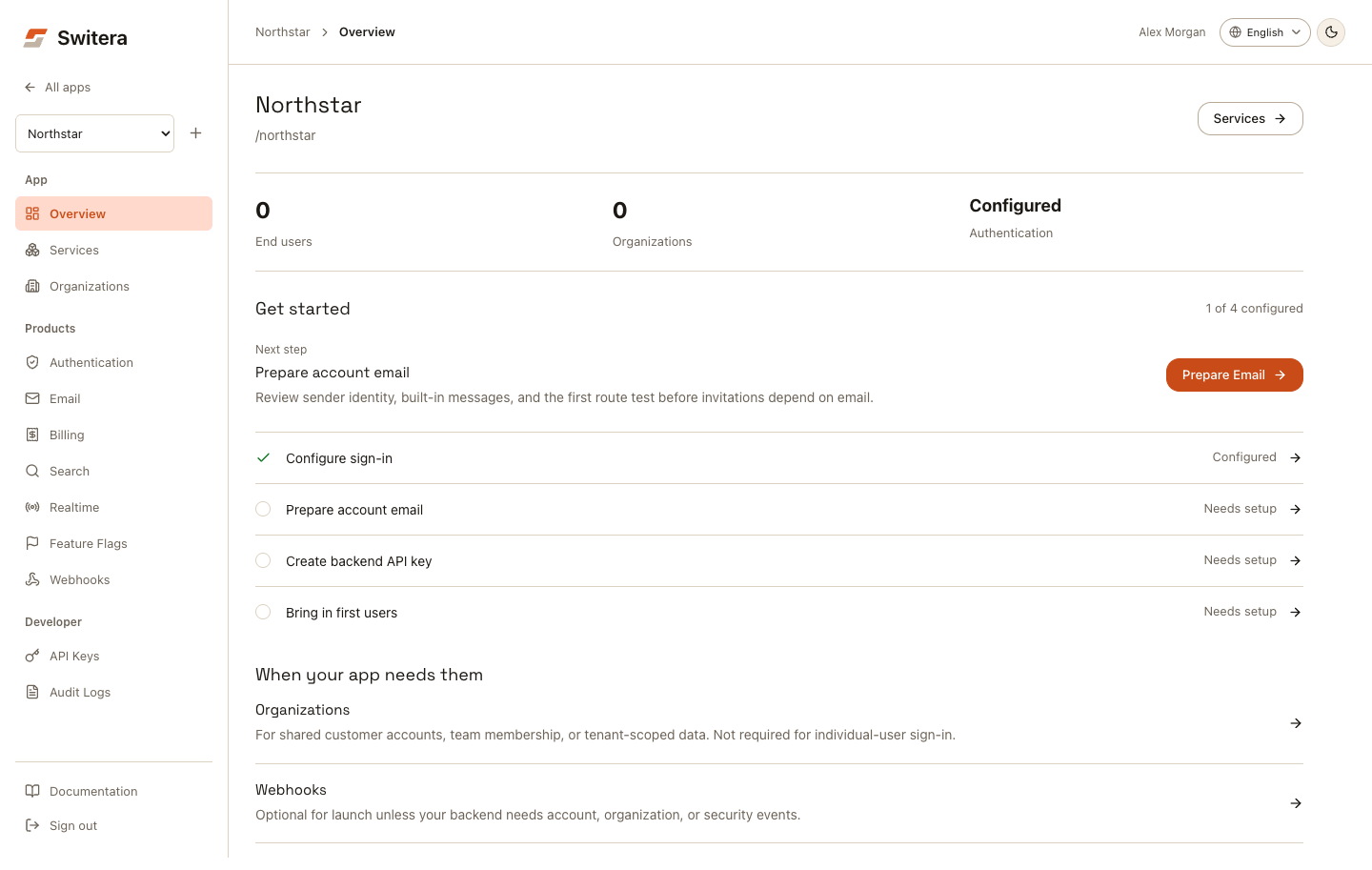
The app overview is the setup home for one SaaS app. It shows the selected app, end-user and organization counts, Auth configuration, and one next setup action.
Continue setup
Select Run locally for an app-specific SvelteKit workspace download. The starter guide covers installation, server credentials, hosted sign-in and persistent workspace tasks. Existing applications can follow the SDK integration path without downloading a starter.
- Select the app in Current app.
- Open Overview.
- Follow the action under Next step.
- Return to Overview after saving the configuration.
The Get started sequence is a suggested baseline for an app using Switera Auth and account email. It is not a requirement to adopt every Switera service.
| Item | What counts as configured |
|---|---|
| Configure sign-in | At least one password, email code/link, passkey, social, or SSO method is enabled. |
| Prepare account email | A sender address exists and Email reports no runtime alerts. |
| Create backend API key | A secret key exists for server-to-server API calls. |
| Bring in first users | The app has at least one end-user record. |
A configured method is not proof that credentials, redirects, or delivery work. An end-user record is not proof of a successful sign-in. Test the complete journey in your app before launch. Browser-only hosted Auth integrations use their public OAuth client configuration, not a secret backend key.
Organizations are conditional
When your app needs them contains Organizations and Webhooks.
Create an organization for shared customer accounts, team membership, or tenant-scoped storage and other services. Individual-user sign-in does not require an organization. Enabling organization access is not the same as requiring every end user to join a team.
Add Webhooks when your backend needs event notifications. An endpoint record does not prove that the receiving server accepts deliveries.
Read configuration status
| Status | Meaning |
|---|---|
| Configured | The relevant configuration or record exists. Validate it with a real test. |
| Needs setup | The loaded configuration is missing this setup item. |
| Needs attention | Email reports an issue that needs review. |
| Couldn't load | The request failed. Retry before deciding anything is missing. |
The score counts initial configuration, not production readiness. Even after all four items are configured, use the activation checklist to validate sign-in, isolation, delivery, credentials, and operations.
Find ongoing work
- Services lists app products and links directly to each console.
- Authentication > End Users opens account records and sessions.
- Organizations opens customer accounts and team membership.
- Developer > API Keys manages server credentials.
- Developer > Audit Logs shows recorded configuration activity.
The workspace dashboard summarizes app records and organization issues. It does not infer Auth health from organization counts or send every new app to organization creation.